Card View
The [Card] option in the context menu leads to the following view:
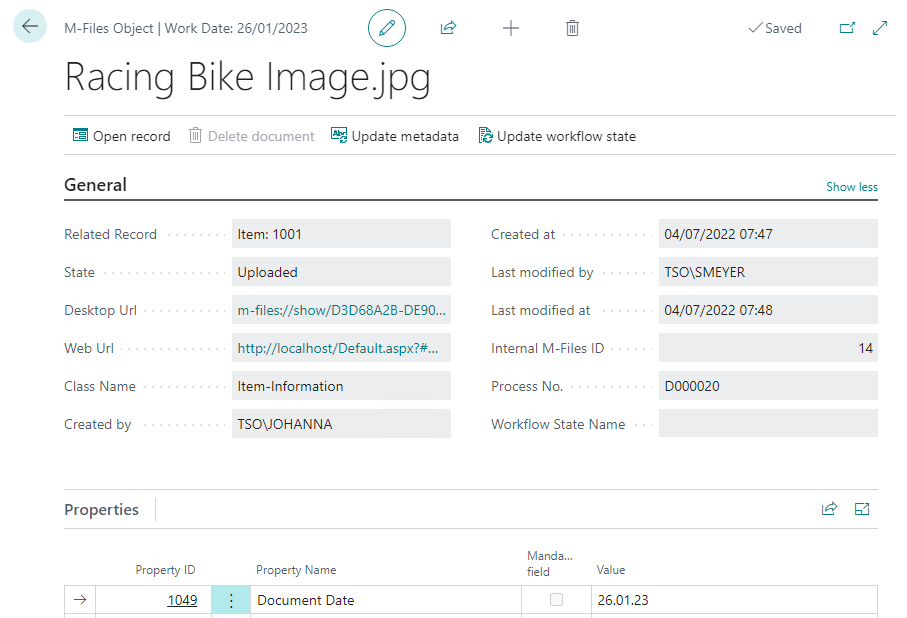
General tab
- Related Record: displays the associated record
- State: shows whether a document has already been uploaded or whether the upload is pending
- Web URL: contains the URL to the SharePoint Online web client
- Created by: contains the user ID of the person who uploaded the file
- Created at: shows the timestamp at which the file was uploaded
- Last modified by: contains the user ID of the person who last modified the file
- Last modified at: shows the timestamp at which the file was last modified
- M-Files ID: contains the ID of the document in M-Files
- Transaction No.: displays the DMS transaction number ## Properties tab Lists all M-Files properties of the document and their values.
- Property ID: specifies the ID of the property
- Property Name: specifies the name of the property
- Mandatory field: makes the corresponding property mandatory when checked
- Value: specifies the content of the property