DMS Permission Structures
Permission sets for users and administrators are automatically delivered with the system.
- DMS ADMIN TDMS - For administrators who have in-depth knowledge of the DMS Connector functionalities and want to set them up or customise them themselves. Includes rights to read, insert, edit and delete data records for all DMS Connector tables.
- DMS BASIC TDMS - For users who actively work with the DMS Connector but should not necessarily be able to set it up themselves. Includes rights to read for all tables and some to edit, to insert and to delete.
Selecting the correct permission set
The "DMS BASIC TDMS" permission set is recommended for most users.
Permission sets page in Business Central
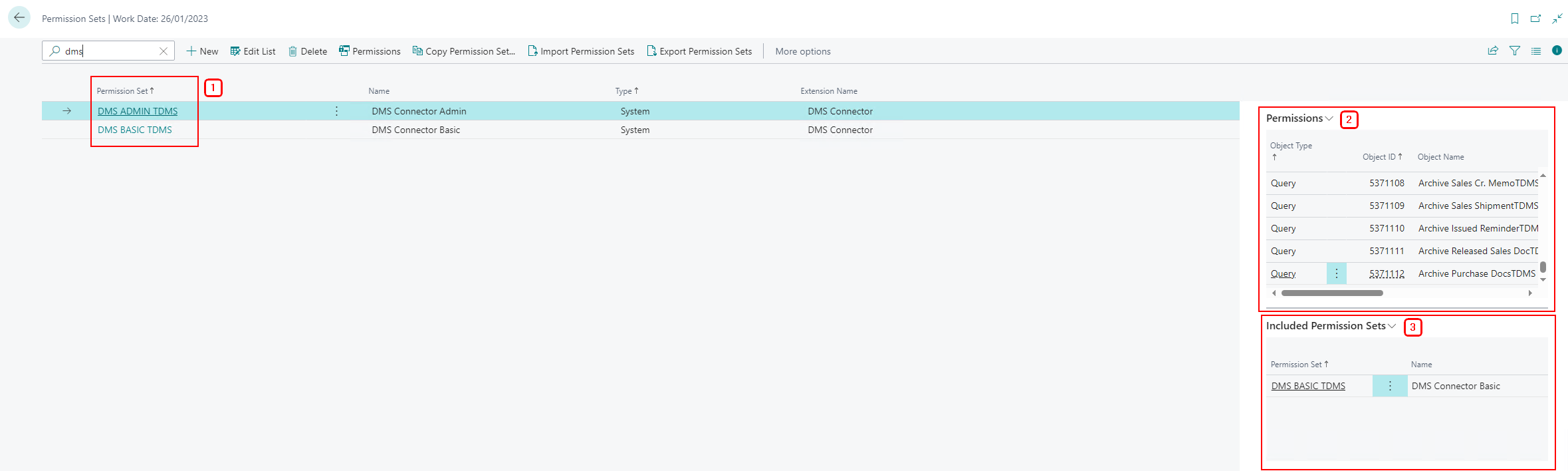
(1) Permission set code
(2) Included permissions in detail - specifies which rights apply to each individual object.
(3) Included permission sets - specifies which other permissions (from other permission sets) are automatically included in the current permission set.
Setting up permission sets
You can find out how to set up permission sets in this Microsoft article.