Card View
The [Card] option leads to the following view :
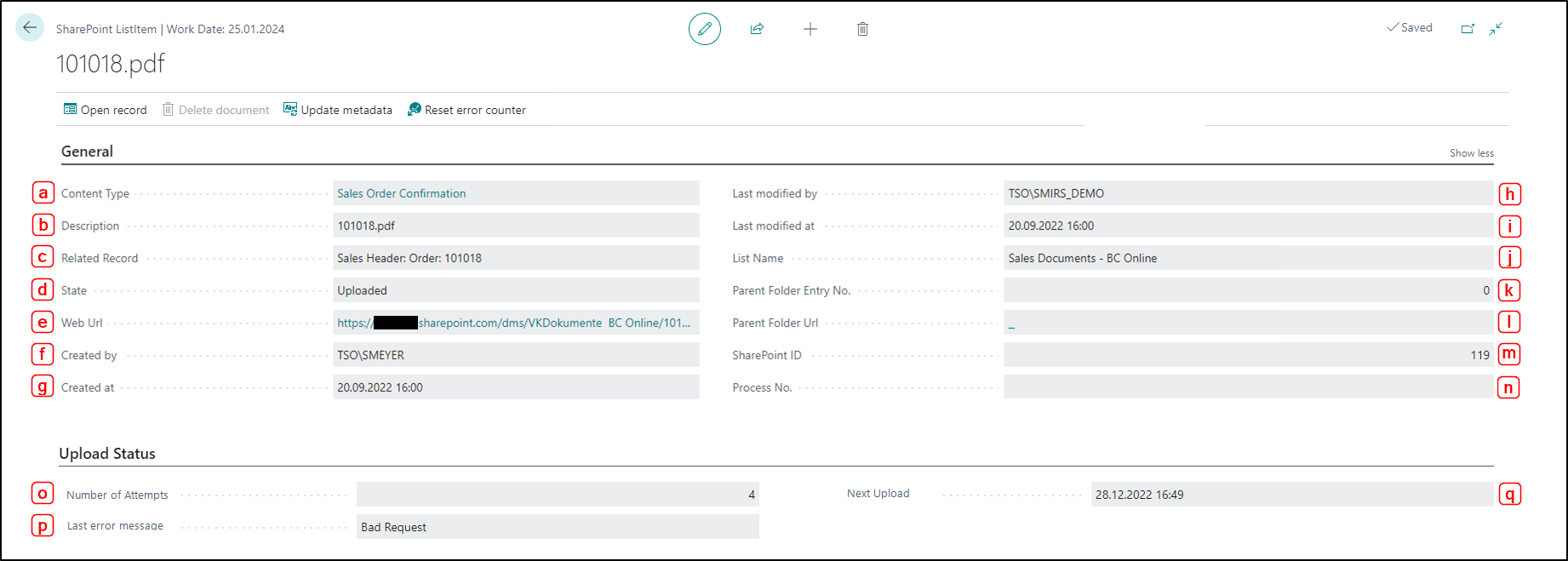
General tab
- Content type: displays the content type stored
- Description: displays the stored data record description
- Related Record: displays the associated record
- State: shows whether a document has already been uploaded or whether the upload is pending
- Web URL: contains the URL to the SharePoint Online web client
- Created by: contains the user ID of the person who uploaded the file
- Created at: shows the timestamp at which the file was uploaded
- Last modified by: contains the user ID of the person who last modified the file
- Last modified at: shows the timestamp at which the file was last modified
- List Name: displays the associated list name
- Parent Folder Entry No: contains the sequential number of the parent folder
- Parent Folder URL: displays the URL of the parent folder
- SharePoint ID: contains the ID of the document in SharePoint Online
- Prozess No.: displays the DMS process number
Upload Status tab
- Number of Retries: indicates the number of previous upload attempts
- Last Error Message: shows the reason for the possible upload error
- Next Upload Time: indicates the date and time of the next upload attempt
Actions
Open record
Opens the Business Central record where the element is located.
Delete document
Deletes the element both in SharePoint and in Business Central.
Update metadata
Updates the metadata of the element.
Reset error counter
Resets the error counter of the element.