Archiving Registered Documents in the Document Capture Document Journal
This function enables the automatic archiving of documents that are captured and registered via Document Capture. After capturing and validation in Document Capture, the system creates a document in Business Central. The timing of archiving purchase documents can be flexibly configured: either directly after completing the registration or only when posting the document. During registration, the content type is determined and the document is stored in SharePoint with the corresponding metadata.
Archiving upon registration is available for both purchase and sales documents.
Configuration
The settings are made in the Document Capture Document Category in the "SharePoint Archiving" section:
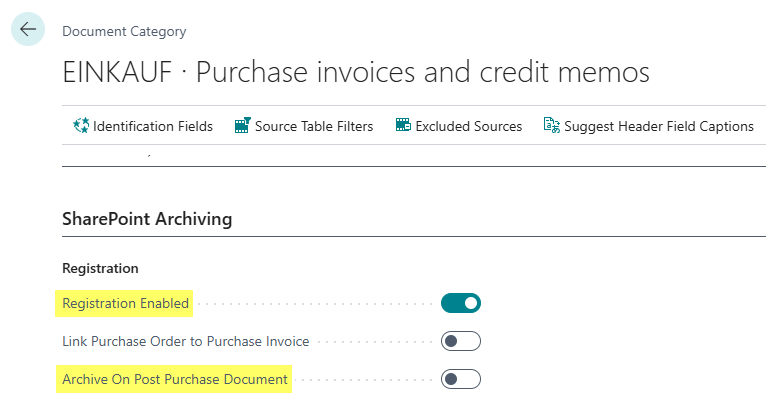
Timing of Archiving (Purchase)
The following two options are mutually exclusive. It is recommended to enable archiving directly upon registration to ensure immediate and complete documentation.
- Registration Enabled: Activates archiving directly after completing the registration. The document is assigned to the created document. This is the recommended setting.
- Archive On Post Purchase Document: Activates archiving only when posting the document. The document is assigned to the posted document. This option requires additional configuration for posted documents (see below). The field is hidden by default and must first be added via "Personalize".
Configuration for Purchase Documents
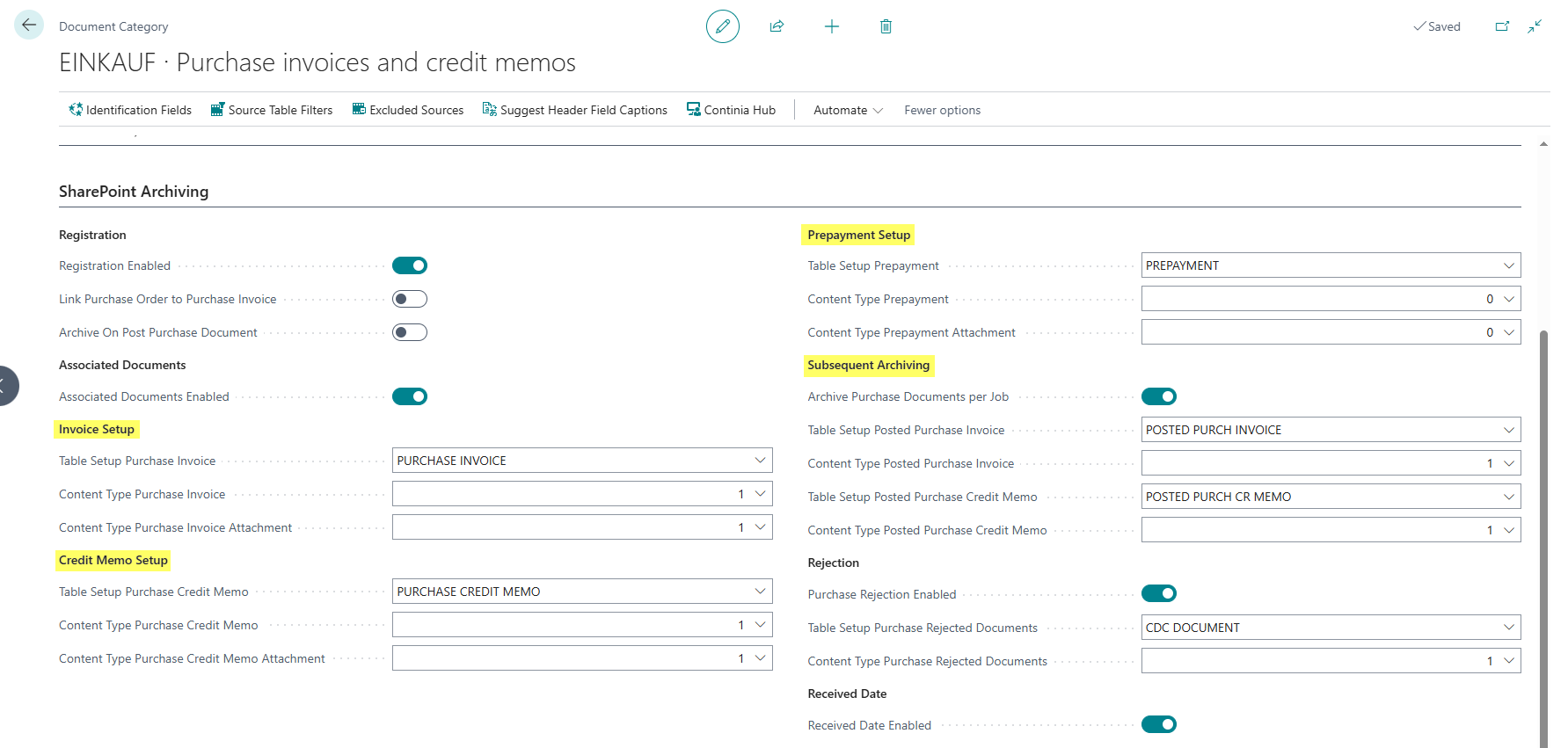
The following settings apply to the archiving of purchase documents (invoices, credit memos, and prepayments):
Upon Registration (unposted documents):
- Table Setup Purchase Invoice: Specifies the SharePoint table setup for purchase invoices. For more information on the setup, see the DMS SharePoint Table Setup Documentation.
- Content Type Purchase Invoice: Specifies the SharePoint content type for purchase invoices.
- Table Setup Purchase Credit Memo: Specifies the SharePoint table setup for purchase credit memos.
- Content Type Purchase Credit Memo: Specifies the SharePoint content type for purchase credit memos.
- Table Setup Prepayment: Specifies the SharePoint table setup for prepayment documents.
- Content Type Prepayment: Specifies the SharePoint content type for prepayment documents.
- Transfer Line Order No. to Purch. Line: Specifies whether the order number captured at line level should be transferred to the purchase line.
Upon Posting (posted documents):
These fields are only required if the "Archive On Post Purchase Document" option is enabled:
- Table Setup Posted Purchase Invoices: Specifies the SharePoint table setup for posted purchase invoices.
- Content Type Posted Purchase Invoice: Specifies the SharePoint content type for posted purchase invoices.
- Table Setup Posted Purchase Credit Memo: Specifies the SharePoint table setup for posted purchase credit memos.
- Content Type Posted Purchase Credit Memo: Specifies the SharePoint content type for posted purchase credit memos.
ZUGFeRD Invoices
For ZUGFeRD invoices, the PDF file and the XML file are available together. The Is ZUGFeRD field controls which of the two documents is archived as the actual document during registration and which one is archived as an attachment.
The setting is made on the Document Capture Template. The field is only available if the associated document category has registration enabled, a purchase document is defined as the destination document, and the template is an XML template.
The registration behavior is as follows:
- “Is ZUGFeRD” enabled
- The PDF file is archived as the document.
- The XML file is archived as an attachment.
- “Is ZUGFeRD” disabled
- The XML file is archived as the document.
- The PDF file is archived as an attachment.
Important Technical Note:
From a technical standpoint, Document Capture currently does not distinguish between an XRechnung with a PDF attachment and a ZUGFeRD invoice (PDF with an embedded XML file). In both cases, an XML file and a PDF file are available once processing is complete. It is currently not possible to uniquely identify or filter ZUGFeRD documents. Therefore, the new field “Is ZUGFeRD” is used to control the desired archiving behavior.
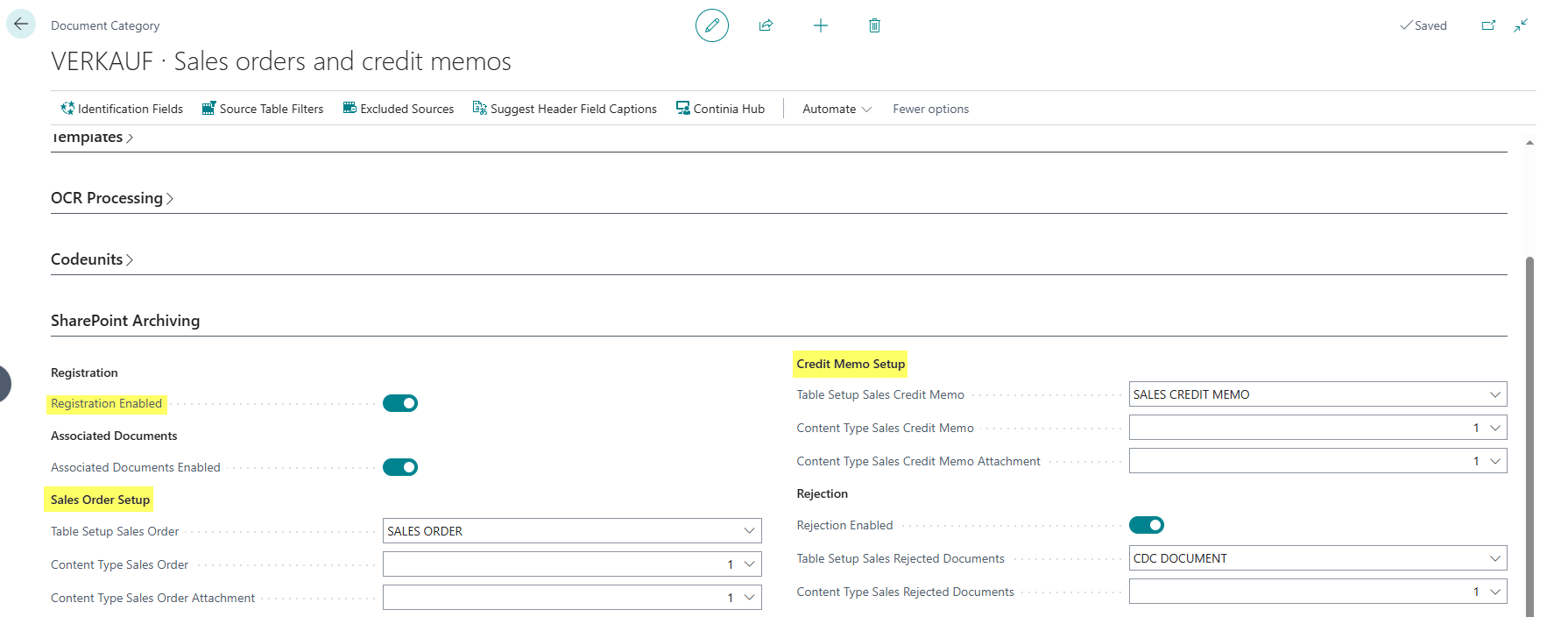
Configuration for Sales Documents
The following settings apply to the archiving of sales documents (orders and credit memos):
- Registration Enabled: Activates archiving directly after completing the registration. The document is assigned to the created document.
- Table Setup Sales Order: Specifies the SharePoint table setup for sales orders. For more information on the setup, see the DMS SharePoint Table Setup Documentation.
- Content Type Sales Order: Specifies the SharePoint content type for sales orders.
- Table Setup Sales Credit Memo: Specifies the SharePoint table setup for sales credit memos.
- Content Type Sales Credit Memo: Specifies the SharePoint content type for sales credit memos.