Substitute user app (TSO.SubstituteUserMgt)
The substitute user app makes it easy to manage absences. Employees have the option of naming a substitute directly in M-Files and defining an absence period during which all assigned tasks are automatically forwarded to the substitute. As soon as the absent person is available again, open tasks are returned to the original person responsible.
The key functions and benefits at a glance:
- Simple substitution setting: In just a few clicks, a substitution can be set in the app and the period of absence defined - without any additional administrative processes.
- Automatic forwarding of tasks: During the absence period, all new tasks are automatically transferred to the substitute. This ensures seamless processes and ensures that no tasks remain unfinished.
- Return on return: As soon as the absent person is available again, all open assignments are automatically transferred back so that no responsibility is lost and everyone involved remains up to date.
- Improved efficiency and transparency: The app minimizes delays and promotes efficient teamwork as all tasks are forwarded during the absence.
Using the substitute user app
Once the configuration is complete, the substitute app is ready to use. If an employee is absent, it is only necessary to enter a substitute and the absence period. The “Substitute active” property is automatically set by the script when an absence is detected or the absence expired.
Configuration instructions
To install the app, follow the guide listed under App installation in M-Files.
Note: All objects, classes and properties required for the substitute user app are already included in our preconfigured Vault.
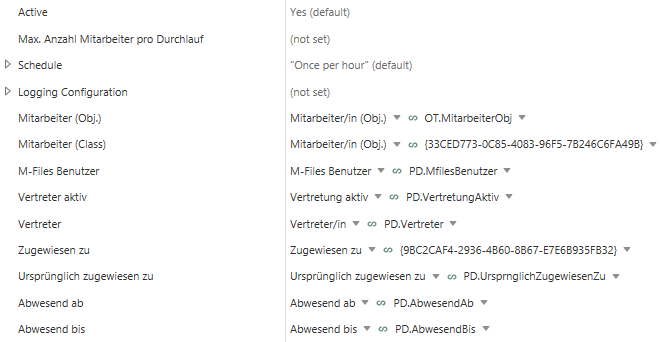
- Active – switches the app functionality on/off
- Max. Anzahl Mitarbeiter pro Durchlauf – defines how many employee objects are checked for absence per script run (default value: empty, all employees are checked)
- Schedule – specifies how often and when the system checks whether employees are absent (default: once per hour)
- Type – to freely configure the times at which the script runs
- None – the script never runs
- Interval – if the script is to run at regular intervals
- Run on vault start – should the script run when starting the vault (in addition to the configured times)?
- Schedule
- Trigger – Specifies whether the script should never, daily, weekly or monthly run. Also requires the configuration of specific days and/or times
- Logging Configuration
- Mitarbeiter (Obj.) – the employee object
- Mitarbeiter (Class) – the employee class
The following properties must have been created for the employee class!
- M-Files Benutzer – single selection that refers to the M-Files user
- Vertreter aktiv - truth value
- Zugewiesen zu (Standard property) – indicates to whom the current assignment has been made
- Ursprünglich zugewiesen zu – indicates to whom the first assignment was made (multiple selection from the user list)
- Abwesend ab – Date from which the employee is absent
- Abwesend bis – Date from which the employee is present again
System requirements
The latest M-Files version is required for full functionality of the substitute app.