Advanced Metadata Viewer (TSO.Kontierung)
Use and benefits of the app
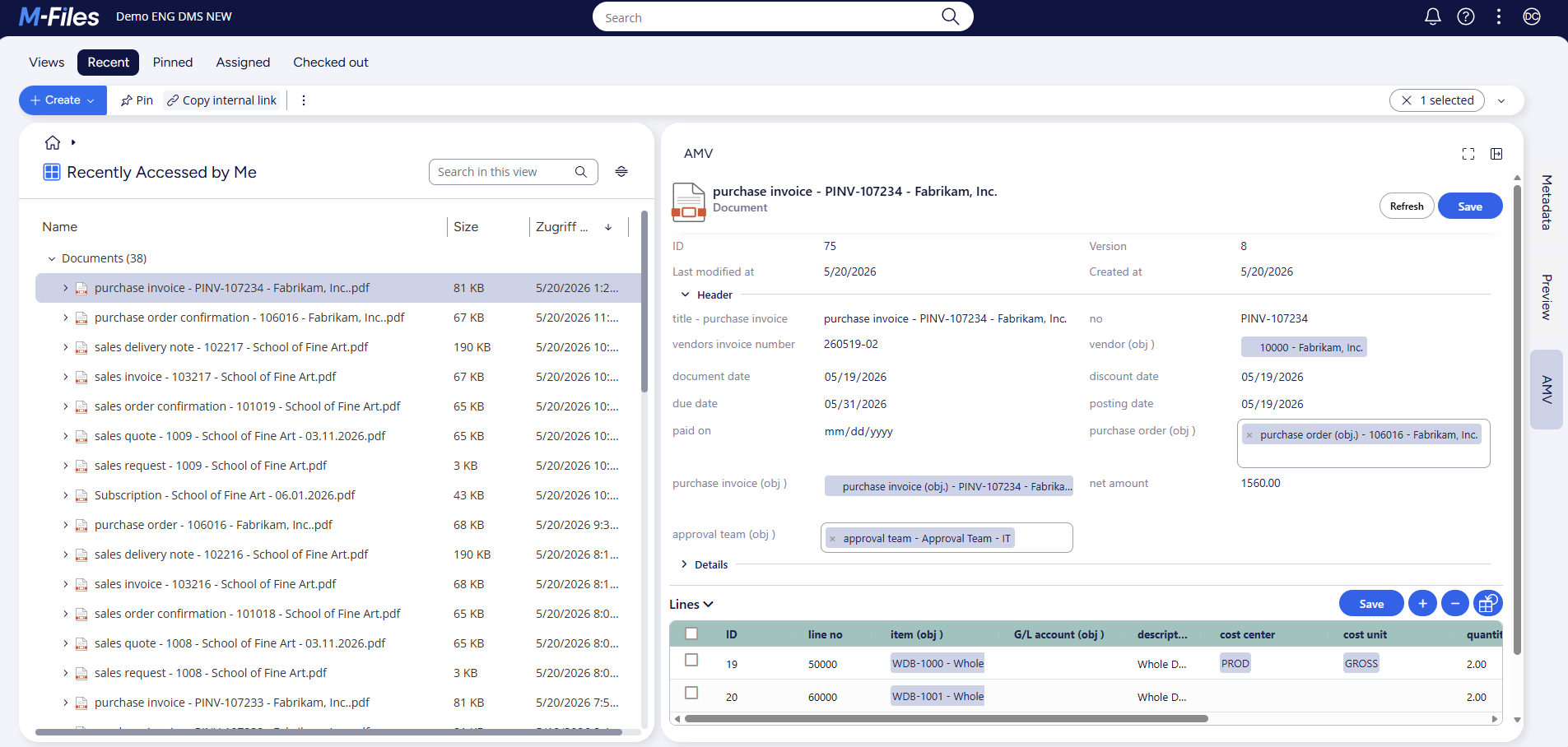
The advanced metadata viewer supports the management and processing of invoices and improves user-friendliness thanks to its clear graphical interface. The most important functions and benefits at a glance:
-
Header-line structure for clear presentation: The AMV solution presents invoices in a header-line structure based on the classic invoice format. This ensures immediate familiarity and makes it easier to enter invoice details quickly.
-
Easy creation, editing and deletion of rows: Users can add new lines, edit existing ones or remove them if required - all within the same interface. This maintains flexibility and invoices can be customized in detail and as required.
-
Optimized clarity and efficiency: Thanks to the graphical display, the management of invoice items becomes more efficient, minimizing processing errors and speeding up the overall invoice verification and approval process.
Configuration instructions
To install the app, follow the guide listed under App installation in M-Files.
General notes:
- A simple profile is equivalent to the metadata card and replaces it. The advantage of this is that the metadata is displayed more compactly, which should optimize the user experience and processing speed
- In addition to the functionality of the simple profile, an extended profile also contains a tabular display of line objects. This enables, for example, the account assignment of document lines or similar.
- Any number of simple or extended profiles can be set up
- If both a simple and an extended profile exist for a class, the extended profile is displayed
- It is possible to calculate net and gross prices and display them in the header instead of the footer. If the footer properties are to be displayed at the end of the metadata card, the required fields must also be mapped: At least the fields VAT %, Gross Line Amount, Total Net Amount, Total VAT Amount and Total Gross Amount
Configuration:
- Active - switches the app functionality on/off
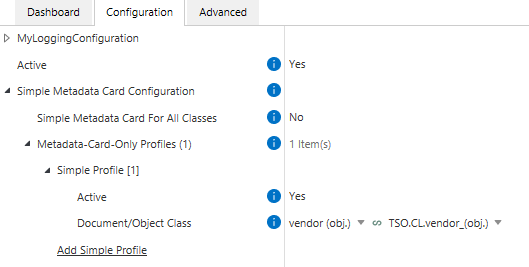
- Simple Metadata Card Configuration - setting up simple profiles
- Simple Metadata Card for All Classes - simple profiles are set up for all classes
- (Metadata-Card-Only Profiles) - to create a simple profile for a specific class. Only displayed if Simple Metadata Card for All Classes is set to “No”
- Active - enables/disables the individual profile
- Document/Object Class - the class for which the simple profile is to be created
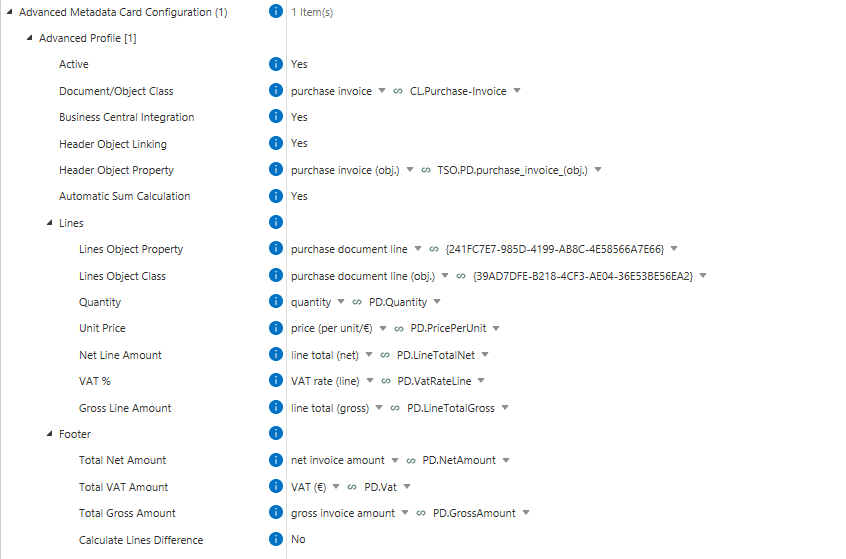
- Advanced Metadata Card Configuration - setting up extended profiles
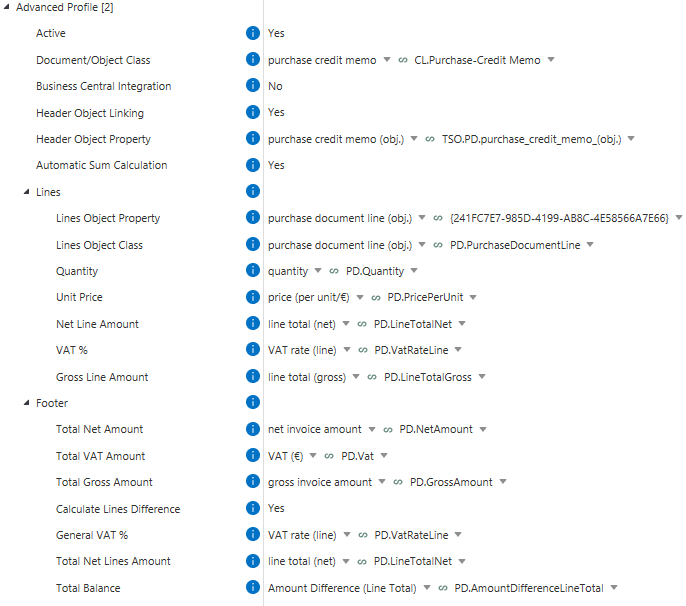
- Advanced Profile
- Active - enables/disables the individual profile
- Document/Object Class - the class for which the extended profile is set up
- Business Central Integration - if data of the configured object is to be transferred from or to BC
- Header Object Linking - Does a header object have to be linked to the current object? (mandatory if a Business Central integration is available, otherwise optional)
- (Header Object Property) - property that represents the header object. Only displayed if Header Object Linking is activated
- Lines - properties required for the calculations
- Lines Object Property - property of the current object that represents the document line object. Is required to identify the document line object
- Lines Object Class - class for the line object
- Quantity - property for the quantity (real number)
- Unit Price - property for the unit price (real number)
- Net Line Amount - property for the net row total (real number)
- VAT % - property for the VAT rate for the row (real number)
- Gross Line Amount - property for the gross row total (real number)
- Footer - properties to be displayed in the footer
- Total Net Amount - property for the net invoice amount (real number)
- Total VAT Amount - property for the VAT amount (real number)
- Total Gross Amount - property for the gross invoice amount (real number)
- Calculate Line Balance - should there be a line comparison between the net invoice amount transferred from Business Central and the calculated net invoice amount?
- (General VAT %) - property for the VAT rate that applies to all rows. If this value is maintained, the information from the lines is ignored. Only displayed if Calculate Lines Difference is activated (Real Number)
- (Total Net Lines Amount) - property for the net total amount of all lines. Only displayed if Calculate Lines Difference is activated (Real Number)
- (Total Balance) - property for the difference between the net total invoice amount and the net total of the lines (real number)
System requirements
The latest M-Files version is required for full functionality of the Advanced Metadata Viewer.