Read E-Invoice Importer (TSO.ReadXMLMetadata)
The Vault app enables data to be automatically read from E-Invoices and inserted into the metadata of invoice documents. Common XML formats and mappings can be set up quickly using a configuration template. The app offers functions for extracting document lines and creating line objects, linked to the invoice document. In addition, the object search function can be used to assign an existing object based on the XML value read out. A validation function checks whether the specified XML paths are correct or contain possible errors.
- Automatic extraction of header and line information
- Support of the two xml formats: UBL and UN/CEFACT or CII
- Flexible customization options for the mapping configuration
Configuration instructions
- Active - switches the app functionality on/off
- Logging Configuration - switches the event log for error messages on/off
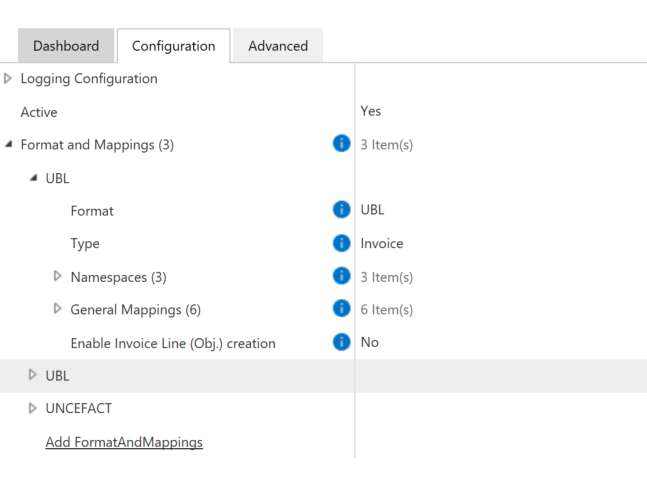
- Format and Mappings - for configuring and creating mappings for each format
- Format - to select the format for which a mapping is to be carried out
- Type - specifies the document type (Invoice or Credit Note)
- Namespaces - list of XML namespaces for the selected format
- Prefix - the prefix of the XML namespace
- URI - the URI of the XML namespace
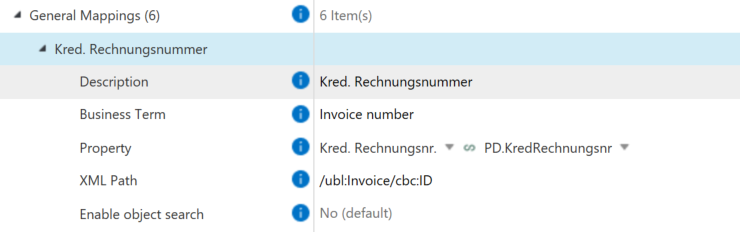
- General Mappings - for the creation of specific mappings
- Description - specifies a description of the mapping and is adopted in its name
- Business Term - the official name of the XML node at the specified XML path
- Property - the property to be filled with a value
- XML Path - the path where the value to be read is found
- Enable object search - activates/deactivates the search for an object in the Vault for reference (see below)
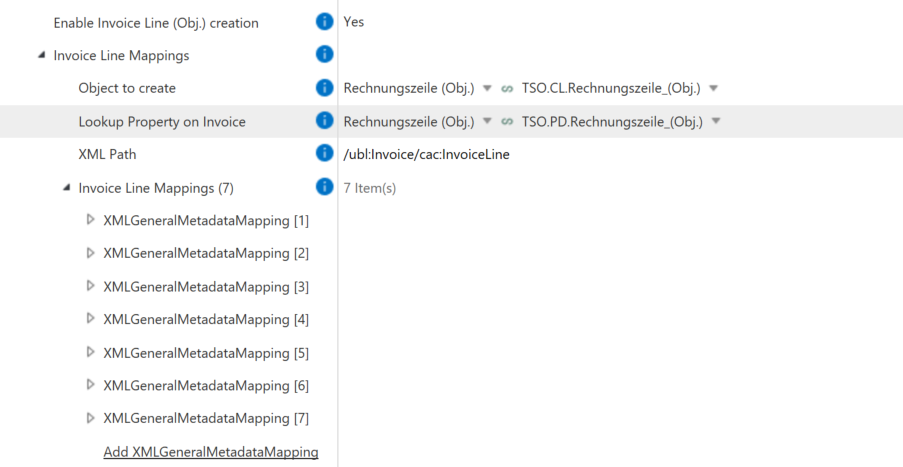
- Enable Invoice Line (Obj.) creation - activates/deactivates the creation of line objects (see below)
General
Mapping
Configuration of the object search
- Object to search for - specifies the class of the object to be searched for
- Property to compare - specifies the property on the search object that should contain the read value

Configuration of the line object creation
- Object to create - to select the object class in which the row objects are to be created
- Lookup Property on Invoice - specifies the property (as a lookup) on the invoice document to which the row objects are to be added
- XML Path - XML path to the invoice lines in XML format
- Invoice Line Mapping - configuration of the mapping (analogous to the invoice object mapping)
Validation of configuration
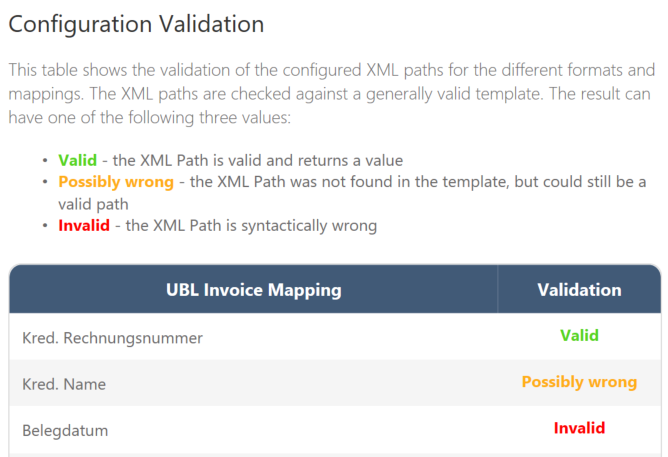
In M-Files Admin in the dashboard of the Vault app, a table can be seen for each format set up with mappings, which checks the specified XML path against a generally valid template for each mapping and provides information as to whether the path is valid or not. There are three different statuses:
- Valid – the XML path was specified correctly and a value can be returned
- Possibly wrong – the XML path was not found in the template, but may still be valid (e.g. extension of the standard)
- Invalid – the XML path is syntactically incorrect
System requirements
The latest M-Files version is required for the full functionality of the Vault app.