Operation (NAV)
The GDPR Toolbox supports the special data protection requirements in Microsoft Dynamics NAV within the framework of the General Data Protection Regulation (GDPR). In this part of the documentation, the operation of the GDPR Toolbox is presented using example processes. Since each company works individually and the characteristics of data protection are manifold, the documentation of these example processes is to be understood as a suggestion and basis for the possibilities. The processes presented here do not claim to be complete and must therefore be checked, revised and supplemented in cooperation with the data protection officer.
Contact Creation
If the user creates a new contact, the time for which the data for this contact is to be retained/saved is defined as soon as the contact is created. During creation, the table specifications from the data structure setup are interpreted and a planned action date as the action type (delete or make anonymous) are determined and inserted in the "Planned actions" table. In addition, a link is created with the reference to this entry in the table and displayed to the contact - this link establishes a connection between the contact and the planned action (in this case "Delete").
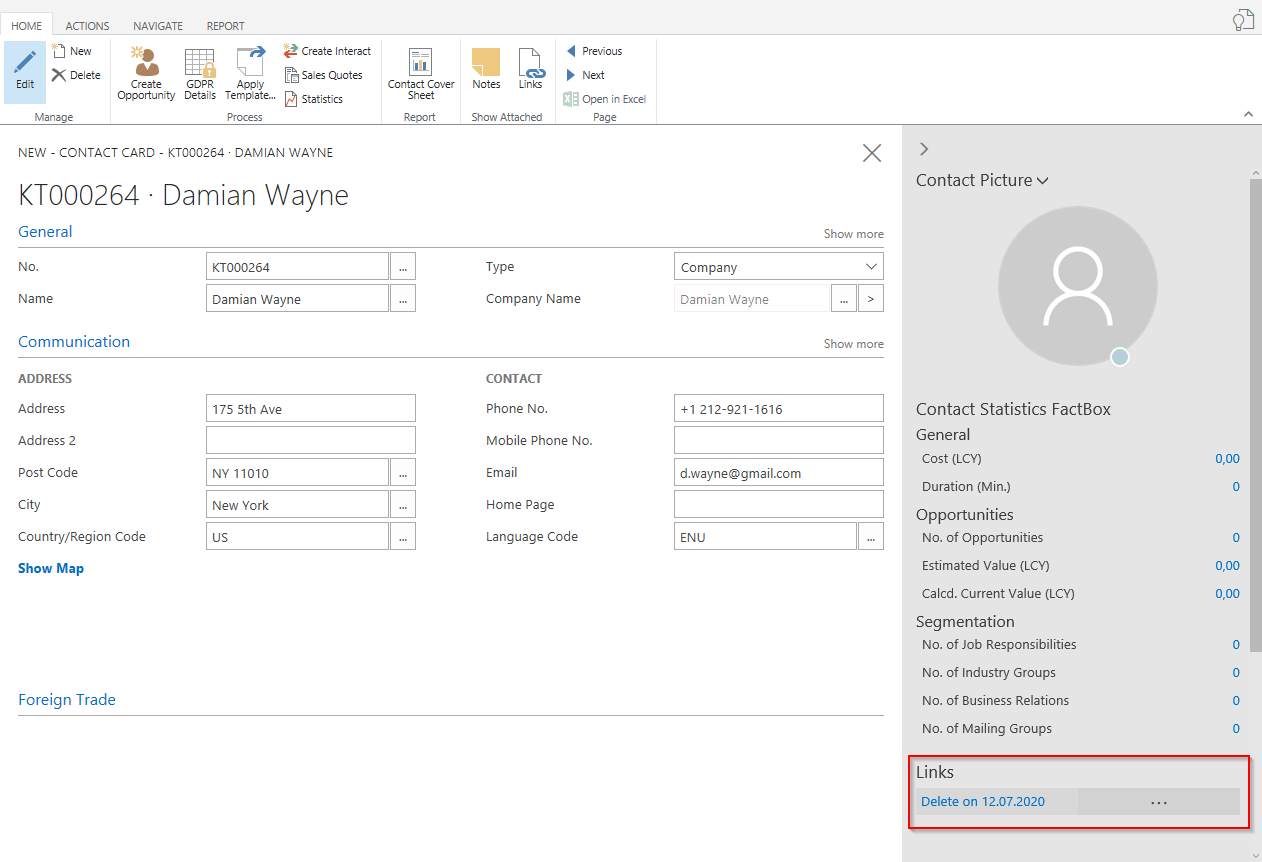
The links are created for the client type defined in the GDPR Setup.
GDPR Details
The GDPR relevant contact details are provided as a separate page in the form of the "GDPR Details" campaign on the contact card.

This page shows some information about the contact itself (name, address,...). The "Exclude from segment" field is also displayed here and synchronized with the contact card. In addition, the origin of the data can be defined in the information register "Data origin" in the form of a data origin code and due to the setting in the data origin code campaign, also an origin campaign.
The data processing consents for this contact can be documented in the data processing consents register. The "Agreed" indicator documents the corresponding processing purposes in the "Processing purposes" info box. Should a contact revoke the data processing consent, the processing purposes will be removed automatically. If overlapping processing purposes have been defined in different consent declarations, the data record will only be removed in the Processing Purposes infobox if all corresponding consent declarations have been revoked.
With the action "View Personal Data" the personal data of the contact and the corresponding data structure, in which the table "Contact" is contained, can be called up directly from this view. If the change log is activated for the table "DSGVO-Details", you can use the action "Change log" to view the logged changes for this contact.
Customer Creation
The creation of the customer is entered according to the same principle as for the contacts link and a data record in the planned actions of the GDPR Toolbox. In this example, the function "Create as customer" was used for a company contact.
Scheduled Actions
With the link on the data set you can call up the scheduled actions for this data set - alternatively the planned actions can also be called up directly from the menu of the GDPR Toolbox.

In this view, it is possible to reset the status "Suspended" to "Waiting" so that the check can be carried out again in "Create suggestions". You can also specify the postponement and a newly planned date for the "Delete/anonymize" action and a reason from the "New Reschedule Reasons" table.
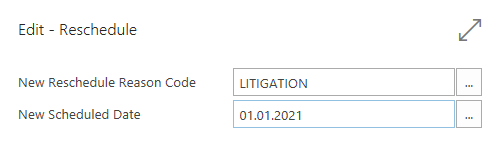
This table also forms the basis for the creation of proposals to carry out the actions for deleting/anonymizing the data records. These suggestions are used in the GDPR Toolbox to monitor the planned actions and that the user has the possibility to check and override the results or the execution, based on the settings at the table defaults, before executing the action.
Automatically update scheduled actions
The scheduled actions can also be updated using the job queue. The entry and the call of the job queue item can be reached from the DSGVO Toolbox setup. In addition to this activation, the subsequent update must be activated in the corresponding table defaults (tab " Scheduled action ").
The indicator "Manual scheduled actions" defines that the planned actions are updated downstream. To be able to select this option, an integer field for the update (update progress) must exist in the respective table and be created if necessary. For details see GDPR Toolbox Customization.
Create an order / post a delivery and invoice
An order, a posted delivery and a posted invoice are created from the customer. For the tables of the posted documents, you have defined in the table specifications for the data structure that these documents are to be made anonymous.

Request from concerned persons
With the GDPR, private individuals have more rights to the stored data and can make inquiries to companies and public authorities and request information about the stored information. The administration and documentation of these requests are supported by the GDPR Toolbox. The following rights of the data subjects are supported:
- Information - right to information
- Correction - right to correction
- Export - right to data transferability
- Delete - right to delete stored data
Creation of the requesting person
The inquiries of the persons concerned are filed in the "Requesting Persons" section. First, the name, address and communication information of the person making the request is recorded.
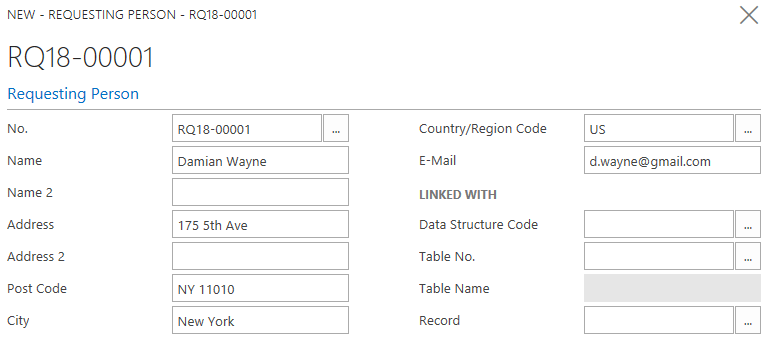
Link to master data
In addition, a reference must be established between the requesting person and the respective master data record. For this purpose, the "Linked to" area is provided in the map view for the person making the request. First you have to decide for a data structure, based on this corresponding example structure you have to define whether the inquiring person is a contact, employee or a resource (e.g. a service provider). You can select the corresponding data structure and store it in the field Data structure code.
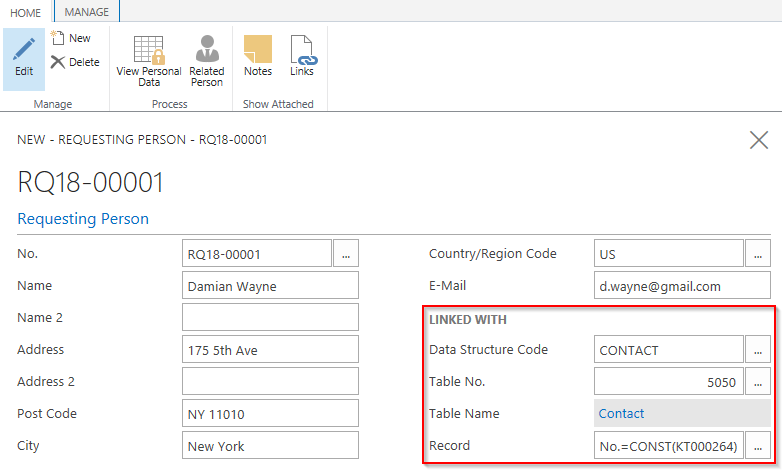
In the data structure, links can be defined at different levels, for example at contact, customer or vendor level. The tables allowed for selection are defined in the table specifications in the data structures ("Allow table for query" field). In the above example of a request, the "Contact" table was defined as a reference to the master data. In the field Data set the corresponding number of the contact can be selected.
Note: The assignment of the data level in the form of the table number is relevant for the subsequent processes such as information and export of personal data. Only data for the underlying tables of the data structure is taken into account, that is, if a query is to be linked and contacts are used, the contact table and the contact number must also be specified and access at customer level must not be selected, otherwise the contact data is ignored.
Once the links have been defined, you can use the "Personal data" action to obtain an overview of the stored information in accordance with the defined data structure and the initial table.

Include request
In the lower part of the inquiry one or more requests of the inquiring person can be recorded. It can also be used to document whether and when the person has already made inquiries in the past. New calls can be entered via the "New line" button in the Requests group in the ribbon.
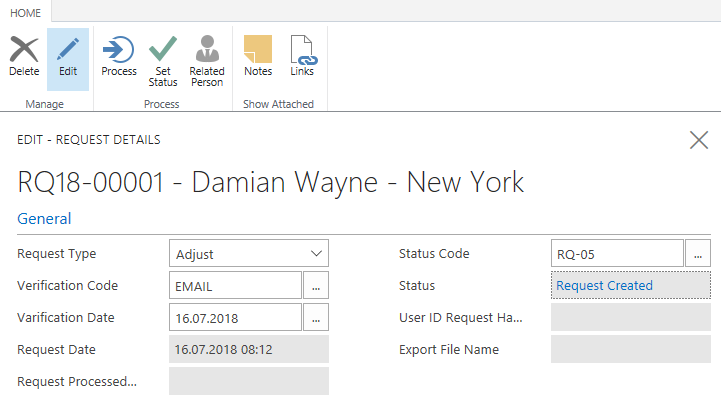
With the field Request type, the request type can be classified into a group for the rights of the requesting person. The request type also controls the executed "Process" function. With the verification code and the verification date, proof of the identity of the person making the request can be documented. In addition, a status for the status of processing can be selected from the "Request status" table. Depending on the selected status, the request is displayed in the corresponding stack of the role center.
Right to information
The Requesting person has a right to information about the stored data. This right is represented in the GDPR Toolbox by a report that determines and outputs the tables and field contents according to the data structure and this report can be made available to the inquiring person in the form of a PDF. If you want to override this standard setting - that is, you want to display even more data or, if necessary, less data - you can solve this problem with an additional field list "Output Field List" in the Data Structure Table. As soon as data is contained there, the standard is overridden. The change is displayed in the data structure using the "Output Fieldlist Active" indicator.
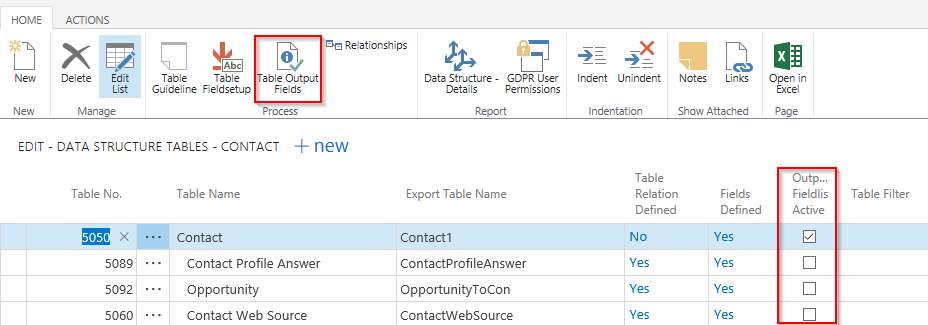
In the request for the person concerned, the request type "Information" is selected and the corresponding report is created using the "Process" action and a link to this report is provided in the field Export file name.
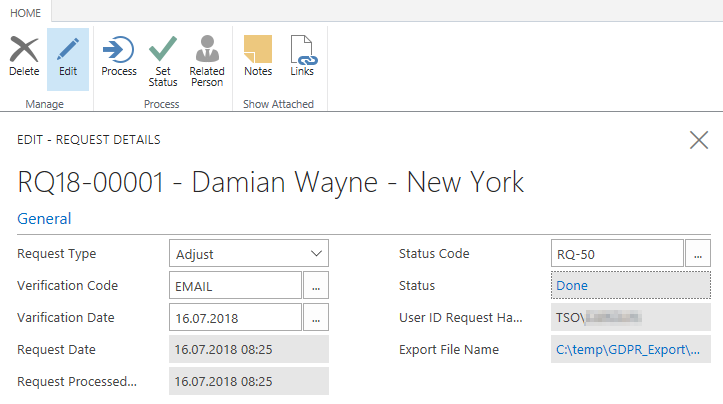
The file is then sent manually, e.g. by e-mail. In the view Request details you can set a manual status using the available actions "Set status" or branch to the assigned master data record via Linked person. The "Process" action has already automatically set the corresponding status from the field Done Status Code of the GDPR institution.
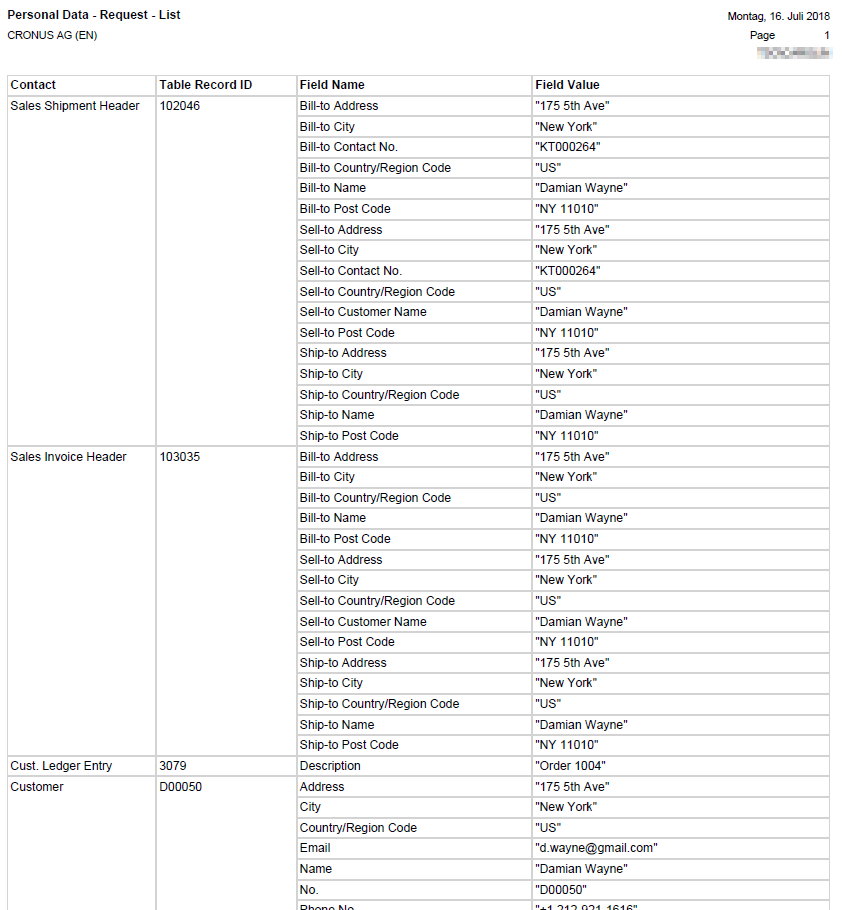
The report on the stored data on the person making the request contains the fields defined in the assigned data structure (field list).
Right to transfer
The data subject is granted the right to transfer data under the GDPR. This right is represented in the query details by the query type "Export". When the request is processed, the data is exported in the form of a CSV file and all tables with the corresponding data and fields from the specified data structure are taken into account and stored as a zipped text file. Alternatively, the setup in the output field list is also taken into account here (see above). This data can then be made available to the inquiring person.
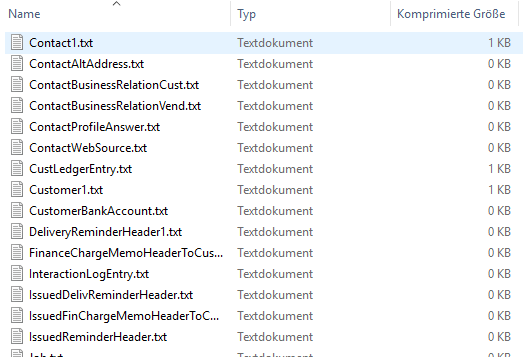
The format for exporting the data has not been defined yet in the GDPR,
so the fields are exported as CSV in the order of the field list.
 The used file names
are created according to the table name and can be adapted in the data
structure in the column Export table name.
The used file names
are created according to the table name and can be adapted in the data
structure in the column Export table name.
Right to correction
The concerned person also has the right, that the stored data will be corrected. This right is represented by the request type "Correction". The correction requests can be varied, so that the actual correction takes place, for example, via the master data. The possibility of changing posted documents does not exist and is also not permitted due to the guidelines for storage. The correction is supported by
- the call of the linked person
- manual correction of data
- the documentation of the correction by describing the changes in the notes and possibly links to the request details
- the status for processing the corrections
The action "Process" sets a corresponding information in the form of a PDF file and sets the status of the corresponding request. In this case, the report is to be understood as documentation and can be sent to the person concerned for correction.
Right to delete
The rights of the GDPR also provide for the deletion of personal data. In principle, you cannot always comply with this right, because there are different, competing requirements for this right, such as the retention periods for booked documents. The corresponding intervals and action dates are set up using the table specifications of the data structure. For this institution, the deadlines are to be chosen in such a way that both the requirements of the GDPR and the retention periods are met. In this demo scenario, we have therefore provided for the "Posted sales invoices" table to be stored for 10 years as a non-legally binding example. As an alternative to deletion, the function Anonymize can also be used in the GDPR Toolbox. In contrast to the deletion of data records, the defined fields are overwritten with anonymizing default values when data records are made anonymous.
If data records are to be deleted, not some selective data records are removed from the tables, but all data of the entire structure for a master data record is always deleted or made anonymous. The planned actions form the basis for checking whether deletion/anonymization is possible. If the date for the execution of the deletion/anonymization is exceeded in all planned actions, the corresponding deletions/anonymizations can be executed.
For the request of a person concerned, this means that the request for deletion can only be met if the corresponding date in all linked data records of the data structure also permits deletion/anonymization. Users of the GDPR Toolbox can call up the stored personal data of the inquiring person directly from the inquiring person ("View Personal Data" action) and determine whether deletion is already possible via the "Scheduled action date" column.
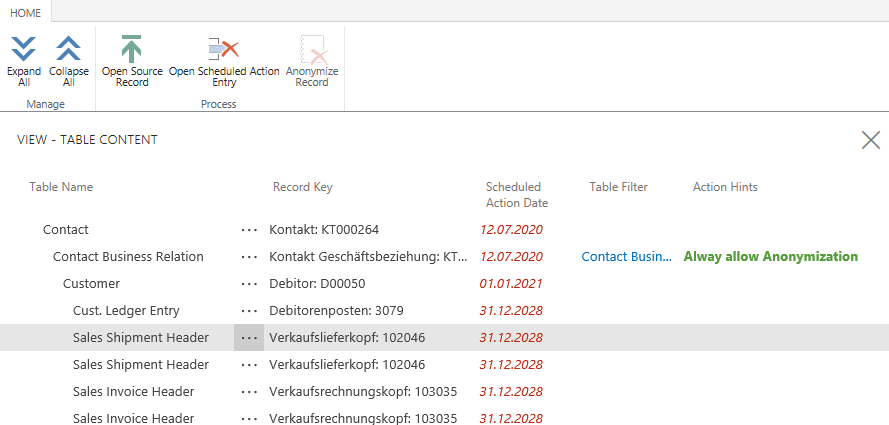
If the detail data allows deletion, a corresponding entry is inserted in the proposed actions when you execute the "Process" action. If deletion is not possible, this can be stored in the notes and the person making the request can be informed.
Suggestions for deleteing/anonymizing
In the "Proposed actions" of the GDPR Toolbox, the master data intended for deletion or anonymisation are inserted. The proposed actions are updated from this view with the action "Create proposals". A fully automated deletion is currently not yet planned and the deletion or anonymization of the corresponding data takes place in two phases:
- Make suggestions for deleting and anonymizing
- Execution of the proposed actions for delete/anonymize
Create Suggestions
The function of the same name for creating proposals checks whether the corresponding action date for deleting/anonymizing has been reached for an unchecked data record and then determines all associated data records based on the data structure and checks whether the corresponding action date has been reached or already exceeded. If all other data records are also allowed for deletion/anonymization, a corresponding master data entry according to the data structure at the highest level, e.g. contact, is proposed in the proposals.
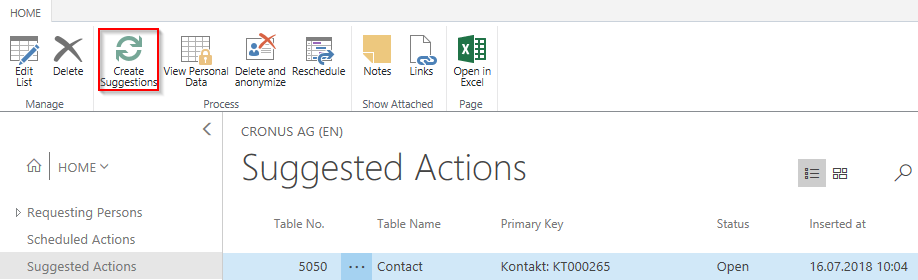
The corresponding proposals can be checked using the "Personal data" action or, alternatively, the corresponding date for the execution of the action can be postponed. To avoid unwanted deletions and anonymization, it is strongly recommended to check the proposals. The rules for deleting and anonymizing are defined in the data structure, the table specifications, the relations and the field list. If several data records are to be processed simultaneously, you can select the desired rows and then execute the action.
Delete and Anonymize
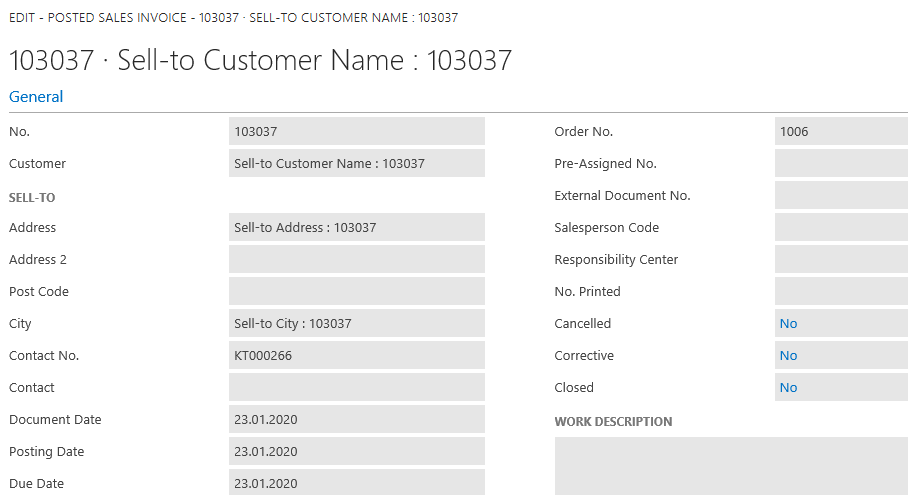
Based on the proposals created and the checks performed, the user can decide that the planned actions should be performed. The "Delete and make anonymous" action can be used to either delete the data records from the database or make the fields anonymous according to the defined field list. The following is an example of an anonymous sales invoice - the corresponding field contents are displayed with the field name and the reference to the primary key.
Archiving
If the suggested actions have been processed according to their settings, they are automatically archived and can be viewed via the menu item "Suggestion Archive". In case of an update of the GDPR Toolbox from an older version, which did not contain this archiving yet, the archiving can be done manually via "Archive Done Actions".

GDPR actions for historical data
For the historical data you can create the planned actions with the help of the batch processing "Create actions from historical data" in the menuband of the GDPR institution. Note that the determination of the action date must be created depending on the field contents of the respective tables - for example, a posted invoice with the posting date 03/15/2013 could be made anonymous as of 12/31/2023. The corresponding definition for the baseline date for calculating the action date is stored in the table specification in the field Planned action date (field number). If no field is specified in the table specifications, field Planned action date (field number), the current date is used as the base date for the cost estimate.
In the table specifications you can define whether the scheduled actions are to be created immediately, i.e. when the data record is created or alternatively downstream. The advantage of downstream creation, particularly for tables with many data records, is that the job queue data writes the transaction and the data to the database at defined intervals or depending on the number of data records processed using the "Commit by number of data records" parameter, closes the transaction and starts a new transaction. This avoids locks on tables. The batch processing described above creates the scheduled actions within a database transaction for all tables and all data records, which can lead to locks when processing many data records. Details of the setup for the downstream actions can be taken from the table specifications in the Setup area.
User Permissions
For the documentation of access rights in the course of the implementation of the GDPR, a report is available which evaluates user access to the tables with personal content across data structures. This report can be accessed directly from the GDPR Toolbox role center.
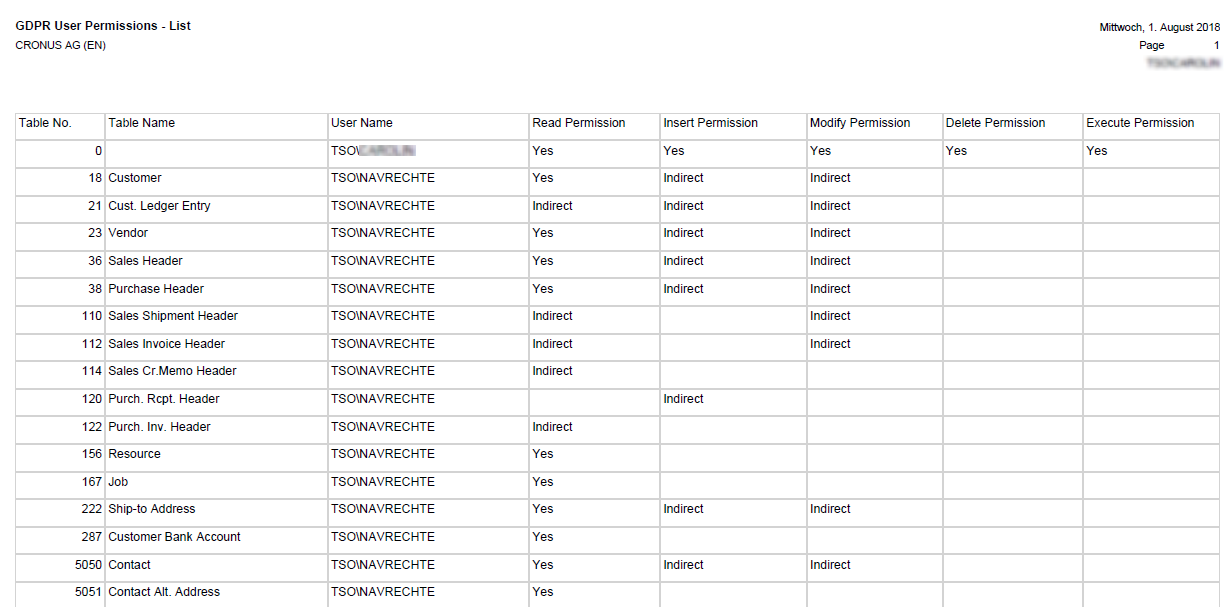
The report evaluates the access rights based on the Users and Access Rights tables at the TableData level. The relevant tables are determined from the table specifications of all data structures.