Customization (NAV)
This article describes the possibilities to extend the DSGVO-Toolbox by individual customizations and thus special requirements in combination with the use of industry solutions or customer customizations. This article contains information that is primarily relevant for NAV developers.
The described adjustments and entry points are provided in the NAV versions 2016 and higher, in the form of events/subscribers. Starting with NAV version 2015 and lower, these enhancements are provided as "function calls".
Create the scheduled actions
The "scheduled actions" are created or changed in the course of the "Insert/Delete/Rename Trigger" and possibly (depending on the configuration) also during the processing of the "Modify Trigger". In order to enable individual rules for the creation of "scheduled actions", the codeunit "Cust. Scheduled Action Mgt. (ID 5459720)" can be used.
Here different functions (3 each) are available for Insert, Modify, Delete and Rename transactions. Below are the three functions provided for the "Insert Trigger":
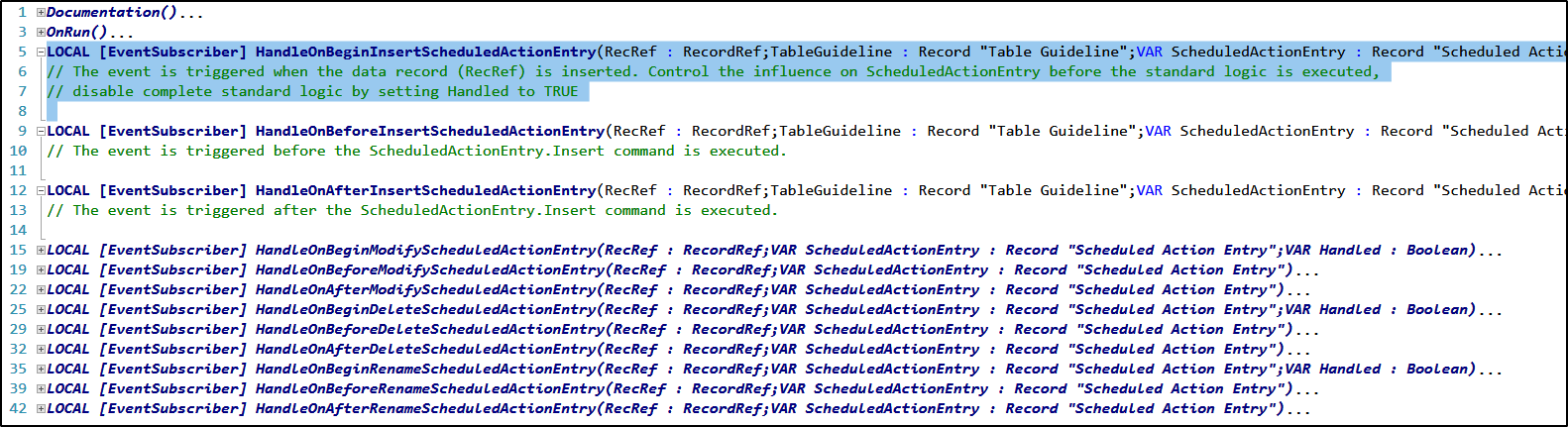
The event for the subscriber "HandleOnBeginInsertScheduledActionEntry" is executed at the beginning of the standard function for inserting the "scheduled actions". At this point it is possible to intervene before the standard code is executed. The parameter "Handled" can be used to define whether the standard code is to be executed afterwards or whether the standard call is to be terminated with an EXIT.
The event for the subscriber "HandleOnBeforeInsertScheduledActionEntry" is executed immediately before the insert into the table "Scheduled Action Entry". The event for the subscriber "HandleOnAfterInsertScheduledActionEntry" is executed immediately after the insert into the table "Scheduled Action Entry".
For the provided functions, the data record (RecRef), the table specifications of the data structure (Table Guideline), the Scheduled Action Entry and, depending on the function, a base date for the calculation of the action date can be passed as parameters. In addition to influencing the "planned action", the effects on the actual data, e.g. in connection with an intercompany logic, can also be mapped here.
Update scheduled actions via the job queue
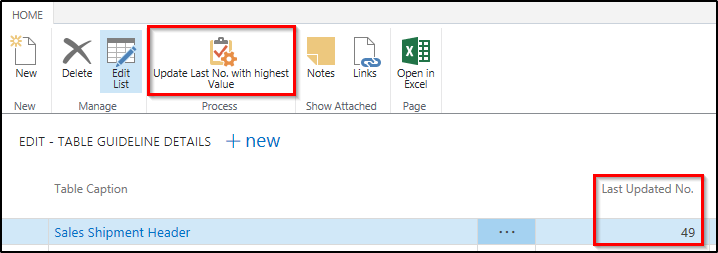
The scheduled actions can also be updated using the job queue. The entry and the call of the job queue item can be reached from the DSGVO Toolbox setup. In addition to this activation, the subsequent update must be activated in the corresponding table guidelines (tab " Scheduled action ").
The " Manual Scheduled actions" indicator defines that the scheduled actions are no longer created (or possibly updated) in the "OnInsert" tab of the data record, but are added later. To be able to select this option, an integer field for the update (update progress) must exist in the respective table and be created if necessary. In addition, an index must exist for this field.
Note:' A developer license is required to create the field and the index! Without a corresponding integer field and an index for this field, this option cannot be used.
Below we have created the corresponding field for the Sales Delivery Header table as follows:

In this example we have decided to use an AutoIncrement in the properties of the field, because in this example the option "Move action" is not used.

If you want to use the option "Move action" and want to influence the creation of the scheduled actions there depending on the field contents, it can be useful to implement your own business logic for updating the field, which then updates this counter each time a data record is updated.
In addition to specifying the field for identifying the scheduled actions to be created (field), you can also use a commit ("Commit per" field) depending on the number of processed data records.

By specifying a value in the Commit by Number of Records field, you can avoid table locking for large update actions. The corresponding progress or counter value for the last record processed can be viewed with the "Update details" action.
Here you can also generate the last updated entry if you activate it later.
Delete and Anonymize
Many customers use industry-specific solutions. These require special procedures for the processing of planned deletions and anonymizations, for example in connection with intercompany processes.
In order to be able to implement these special features centrally, the code unit "Cust. Deletion Mgt." (ID 54597). (ID 5459721) has been made available. The following functions are available:
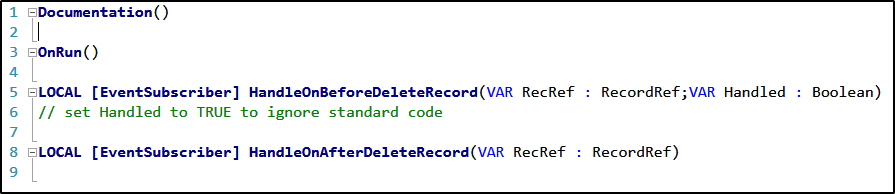
The parameter "Handled" can be used in this subscriber to define whether the standard code of the GDPR Toolbox is to be run through after this logic has been executed, or whether the logic implemented here is to consider a completely individual logic.
The special features for anonymizing information in fields can be defined in the code unit "Cust. Anonymization Mgt." (ID 54597). (ID 5459722) can be implemented. Similar functions are available in this code unit:

In these functions, the table and the field to be anonymized are passed within a loop according to the field list in the data structure, so that the creation of the field content for anonymization can be influenced here.
Authorizations at object level
Many data structures contain objects that are not assigned the appropriate permissions to modify and delete records in a customer license. Some permissions, primarily to posted document tables, are already assigned in the default objects of the GDPR Toolbox, so these actions are possible for these tables.
A new code unit (ID 5459723 - Cust. Permission Assignmnt.) has been provided to provide customers and partners with a central location for assigning permissions. The following functions are available in this codeunit:

In the standard functions for deleting and changing records, the system checks whether the license or code unit contains the corresponding authorizations for the respective table. If this right is missing, these functions are called and the deletion and modification are moved to this object. The corresponding permissions must then be assigned here or forwarded to separate objects.
Note: In this code unit only limited permissions can be assigned (number of tables is technically limited). The assignment of permissions is only possible with a corresponding developer license.