Linking Order Documents to Invoice After Registration
This function enables the automatic linking of order documents already archived in M-Files with newly archived invoice documents. When a purchase invoice is registered in Document Capture and archived in M-Files, the system checks whether documents for the linked order have already been archived via the DMS Connector. If order documents are found, references are automatically created between the invoice and the associated orders, so that all documents can be found in the DMS dropform of the purchase invoice.
The identification of associated orders is done in two ways: via the Document Capture order matching (when invoice lines have been matched with order lines) or via the order number captured in the document header.
Configuration
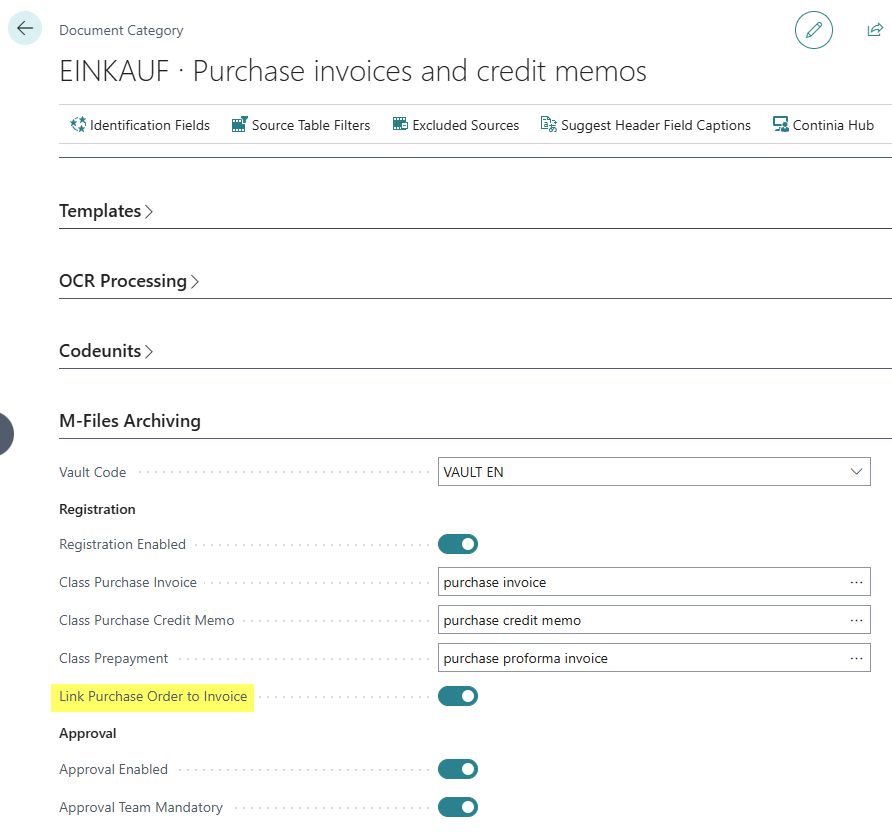
The settings are made in the Document Capture Document Category:
- Link Purchase Order to Invoice: Activates the automatic linking of order documents to the invoice. When this field is enabled, references to already archived order documents are automatically created when registering a purchase invoice.
Prerequisites
The following prerequisites must be met for this function:
- The archiving of registered documents must be configured and enabled for purchase invoices
- *Order documents must have already been archived inin SharePoint in M-Files
- The order number must have been captured either via order matching or in the document header